Statistics Computations (cwstats)
The cwstats program is a command line tool that calculates a simple set of statistics for each variable in a data file. For example on the Himawari-9 AHI data file, try showing the contents and then computing statistics on 1% of the data (sampling factor = 0.01):
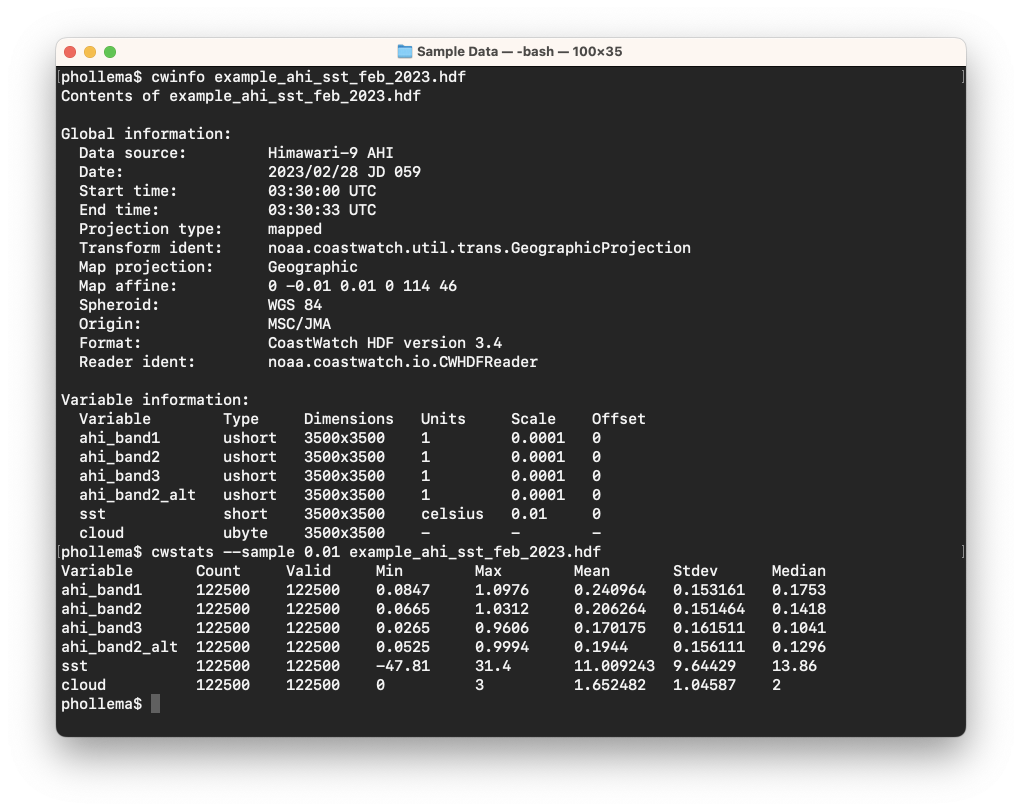
As shown above, the tool calculates:
- Count — the count of total data values sampled
- Valid — the number of valid (not missing) data values
- Minimum — the minimum data value
- Maximum — the maximum data value
- Mean — the average data value (arithmetic mean)
- Standard deviation — the standard deviation from the mean, ie: square root [1/N * ∑ (x - mean(x))2 ]
- Median — the median data value (middle value of sorted data values)
The main use for cwstats is a quick assessment of data quality and data value range (also a rough check of equality between data files). The statistics can be limited by:
- Geometry — rectangle, circle, and polygon
- Variable — match variables to an expression
- Sampling factor — percentage or data stride
Try the following options one at a time on the same data file:
--match 'ahi.*'— Only compute on the AHI band data (using a POSIX extended regular expression)--stride 5— Sample every 5th value in each dimension--region 28/131/50— Only compute on pixels within a 50 km radius of [28°N, 131°W]
 Bonus exercises:
- Read the Unix man page or user’s guide on the cwstats tool.
- Create a text file to be used with the --polygon option that draws a polygon around only a portion of the data. Run cwstats with your text file on one of the other example data files and see if the output makes sense.
- You can create a
--matchexpression for any series of variables using the format:'(var1|var2|var3 ... )'. Run cwstats for just the sst and cloud variables in the AHI data file using this expression format.